Turn Your Ideas Into Real-World Experiences
Sell tickets, approve your own guest list, and scan people in at the door — all from your phone. Sports, music, workshops, supper clubs, whatever you run.
Why host on Planstalk
Sell tickets in rupees
Set your price, add early-bird tiers and coupon codes. Payments are collected securely through our payment gateway.
QR check-in at the door
Scan each guest's pass with the in-app scanner. One-time use, locked to your event, with a live attendee list.
You choose the room
Approve or decline every request. Make an event invite-only, and see your bookings and check-in counts in the host dashboard.
How Hosting Works
Apply to host
Send us your host name and a short bio. Our team reviews every application before approving paid hosting.
Create your event
In the app: title, venue, date and time, cover photo, capacity. Add ticket pricing, early-bird tiers and coupon codes if it's a paid event.
Approve your guests
Requests to join come to you. Accept the people you want, decline the rest, and see how many seats are left in real time.
Scan them in
Each confirmed guest gets a QR ticket. Scan it at the door with the in-app scanner and watch your attendee list tick over live.
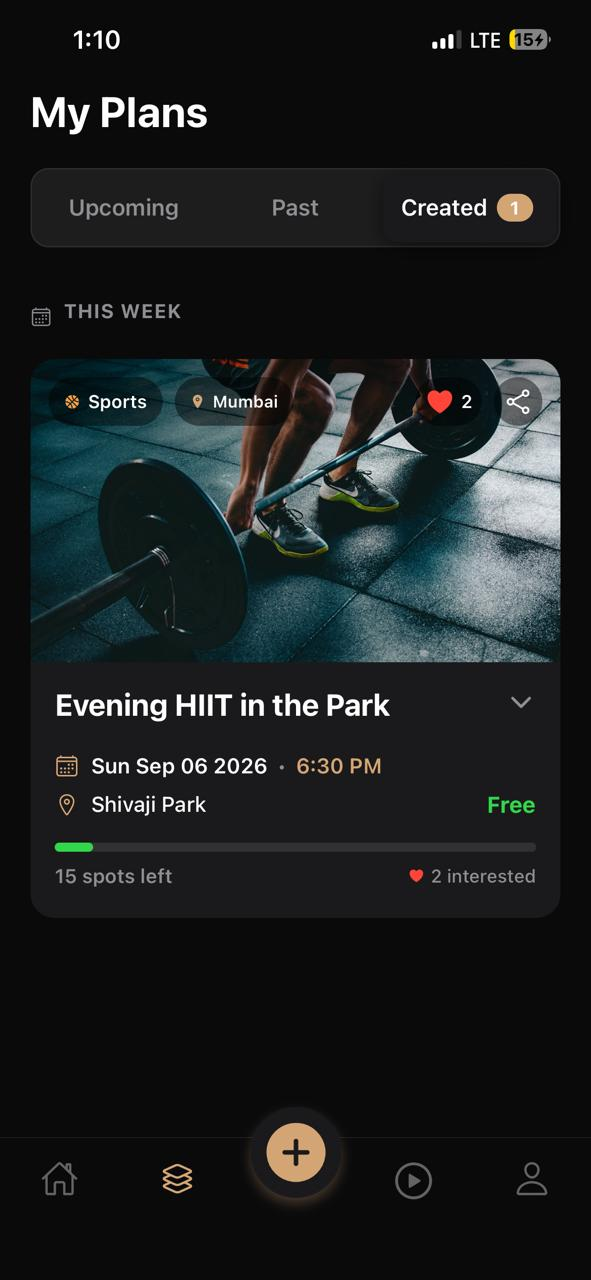
Your events, live in the app.
50+ hosts already on Planstalk
You'd be in good company
Cafés, studios, sports clubs and independent organisers already run their events here — board game nights, art workshops, community runs, padel tournaments and ballet classes.












Apply from the app
Install Planstalk, sign in with your phone number, and open Become a Host from your profile. You'll be asked for a host name and a short bio.

What happens next
- You can create free events straight away — no approval needed.
- A real person reviews every request, usually within a day or two. Approval unlocks paid ticketing.
- Your status shows under “Become a Host” in the app, and you're notified either way.
Questions first? Talk to us.
Frequently Asked Questions
How long does approval take?
A real person reviews every application, usually within a day or two. You'll see your status in the app under Become a Host — pending, approved, or declined with a reason so you can reapply.
How do I get paid?
Ticket money is collected through our secure payment gateway, and your earnings are settled by the Planstalk team. Your host dashboard shows your bookings and estimated earnings. Refunds are handled by our team too, so reach out and we'll sort it.
Do I need approval to host free events?
No. Anyone can create a free plan in the app straight away. Approval is only needed to charge for tickets and accept custom requests.
What kind of events can I host?
Sports and fitness, workshops, wellness sessions, music, food, social gatherings, professional networking — anything people would actually leave the house for.